When a customer writes "I never got your quote", it is rarely because the email was never sent. It has landed in spam, or it was rejected along the way. Very often the cause is three small text records in the domain's DNS that are either missing or set up wrongly: SPF, DKIM and DMARC.
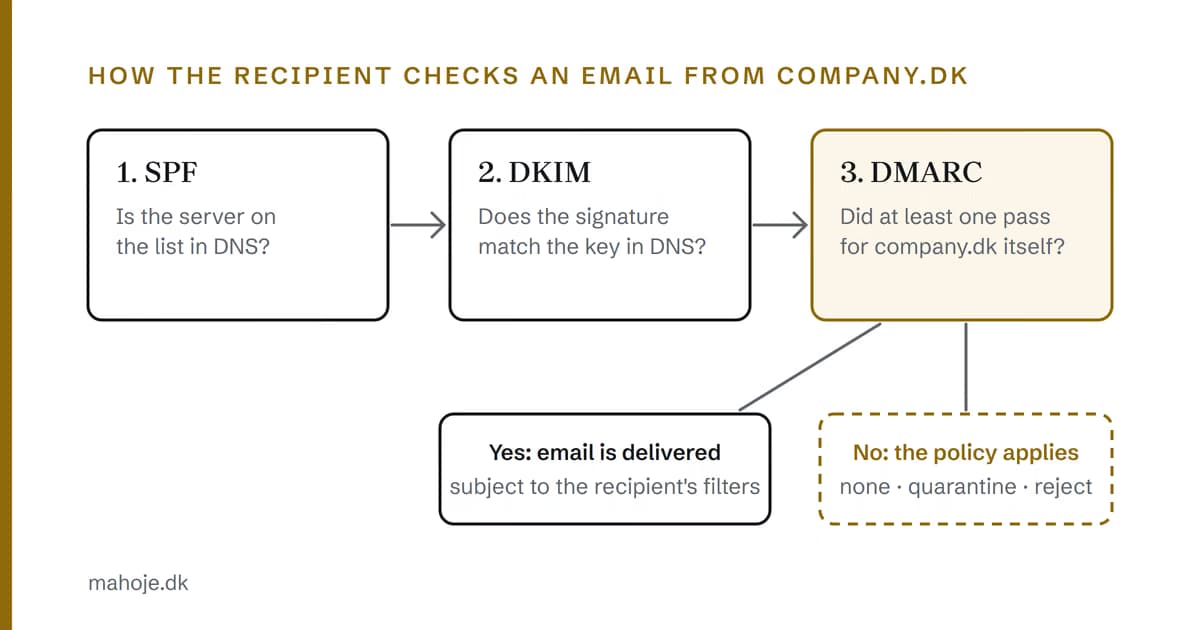
The three records sound technical, but the idea behind them is simple. They let the receiving mail server check whether an email from company.dk really comes from company.dk. Here I explain what each of them does, what the big email providers require today, and how to set them up without stopping your own emails. The standards and the provider requirements apply wherever you are. I also include what the Danish authorities recommend, for readers running a business in Denmark. Every requirement is linked to its source, and the sources are collected at the bottom.
In short
- SPF is a list of the servers allowed to send email from your domain (RFC 7208).
- DKIM is a digital signature on each email, which the recipient checks against a key in your DNS (RFC 6376).
- DMARC tells the recipient what to do with emails that fail, and sends reports to you (RFC 9989).
- Gmail and Yahoo require SPF or DKIM from all senders, and all three from those who send a lot of email (Gmail Help, Yahoo Sender Hub).
- Outlook.com has, since 5 May 2025, rejected email from domains that send more than 5,000 emails a day without meeting the requirements (Microsoft).
- In Denmark, Styrelsen for Samfundssikkerhed recommends DMARC with a reject policy on all domains, including those you don't send email from (Styrelsen for Samfundssikkerhed).
Why it is a problem at all
The sender in an email is just text, and anyone can type company.dk in the field. That is why a fraudster can send a fake invoice that appears to come from you, and why the big email providers have become suspicious of emails they cannot verify. SPF, DKIM and DMARC are the three ways a recipient can verify the sender. They sit as TXT records in your DNS, which is why they are often forgotten.
SPF: who may send
SPF stands for Sender Policy Framework. The record is a list of the servers allowed to send email from your domain. When an email arrives, the recipient looks up the record and checks whether the sending server is on the list (RFC 7208).
An SPF record for company.dk, which sends via Microsoft 365 and a newsletter tool, can look like this:
company.dk TXT "v=spf1 include:spf.protection.outlook.com include:newsletter.example -all"Each include points to a service's own list. Microsoft 365 uses include:spf.protection.outlook.com (Microsoft Learn), while newsletter.example is only an example; the real value is in the tool's documentation. The last part decides what happens to everyone else. With -all you say that all other servers are not allowed (fail). With ~all you say it more cautiously: they are probably not allowed (softfail) (RFC 7208).
Two rules from the standard cause the most errors in practice:
- Only one SPF record per domain. If the domain has more than one, the check returns a permanent error (RFC 7208, section 3.2). This typically happens when a new service asks you to "add an SPF record", and someone creates an extra one instead of editing the existing one.
- No more than 10 lookups. Each
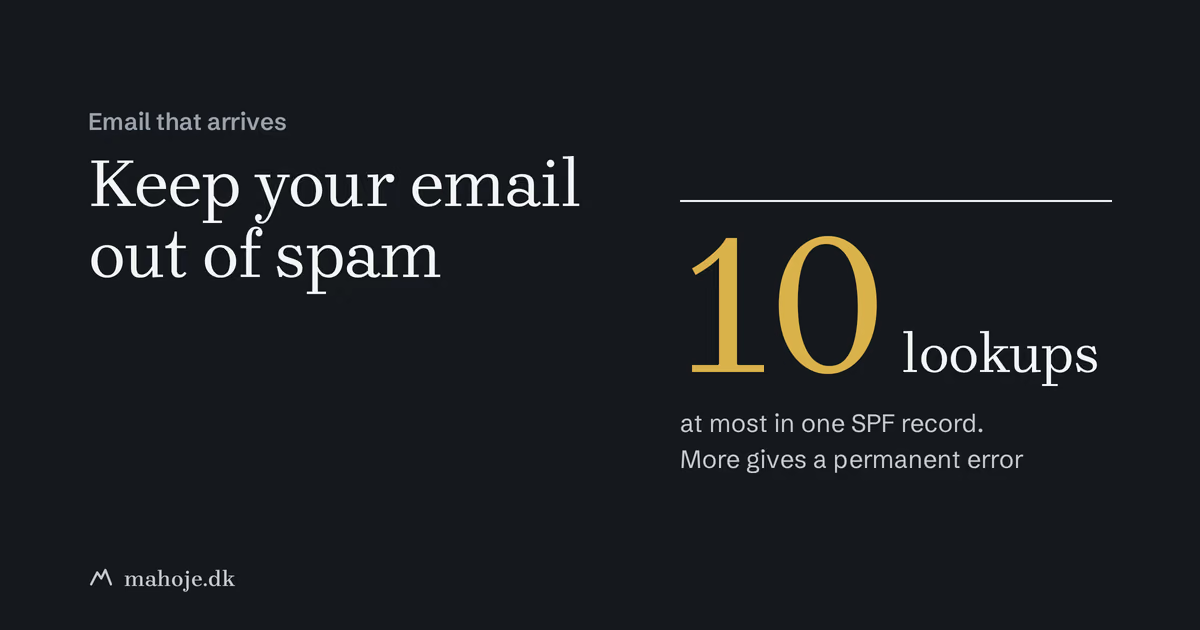
include,aandmxcosts a DNS lookup, and the services you include may have more of their own. If the total exceeds 10, the check also returns a permanent error (RFC 7208, section 4.6.4).
SPF has a weakness. It checks the server delivering the email, and not necessarily the name the recipient sees in the From field. That is the gap DMARC closes.
DKIM: a signature on every email
DKIM stands for DomainKeys Identified Mail. Here the sending server signs each email with a secret key. The public part of the key sits in your DNS, so the recipient can check that the signature matches and that the email was not changed along the way (RFC 6376).
The key sits under a name called a selector, followed by _domainkey (RFC 6376). For company.dk it can look like this, shortened here:
selector1._domainkey.company.dk TXT "v=DKIM1; k=rsa; p=MIIBIjANBgkqh...IDAQAB"You don't write the key yourself. It comes from the service that sends the email. Microsoft 365, Google Workspace and most newsletter tools have a page where you switch on DKIM and get the records that go in DNS. The important thing is that it has to be done for every service that sends in your name, not just your ordinary email.
DMARC: what the recipient should do
DMARC stands for Domain-based Message Authentication, Reporting and Conformance. The record sits at _dmarc in front of your domain and does two things: it tells the recipient what to do with emails that fail, and it asks for reports (RFC 9989). The standard was updated in May 2026, when RFC 9989 replaced RFC 7489. It is the new one I refer to here.
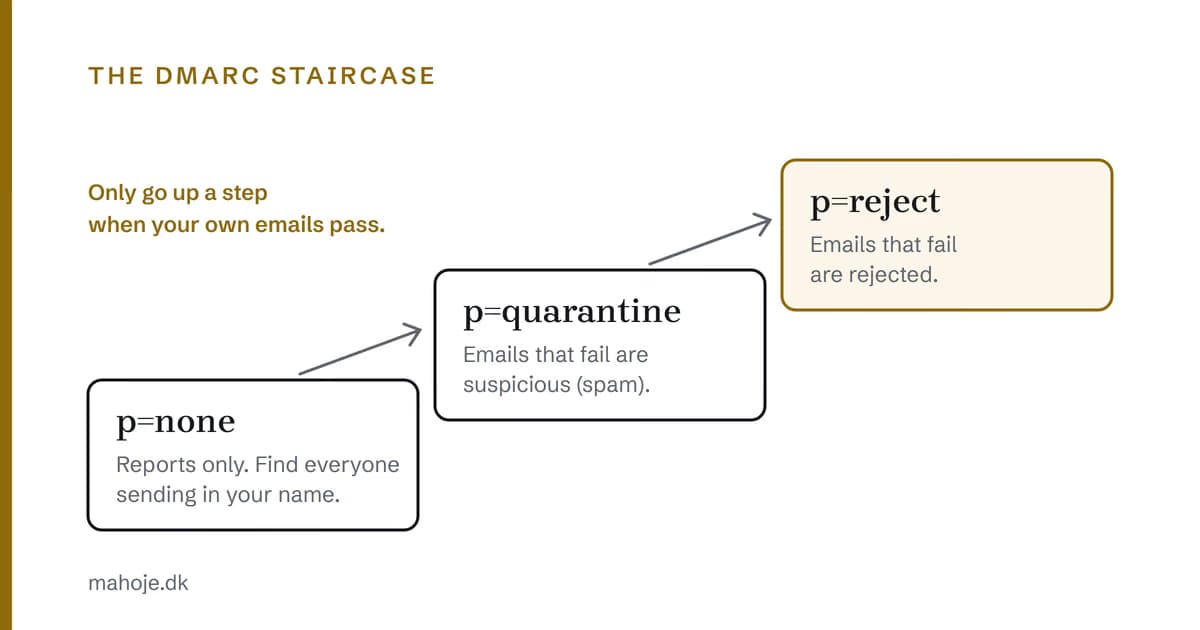
_dmarc.company.dk TXT "v=DMARC1; p=none; rua=mailto:dmarc@company.dk"The policy p has three levels (RFC 9989):
- none: you ask the recipient not to do anything special. You just get reports.
- quarantine: emails that fail should be treated as suspicious. In practice they usually end up in spam.
- reject: emails that fail should be rejected.
rua is the address the aggregate reports are sent to. They tell you which servers have sent email in your name, and whether they passed. The reports arrive as XML files, which are not readable to the naked eye, and the Danish DMARC guidance itself mentions that there are tools that process them automatically (Styrelsen for Samfundssikkerhed).
Alignment: the names have to match
The most important thing about DMARC is one word: alignment. An email only passes DMARC if SPF or DKIM passes, and the domain they verified matches the domain the recipient sees in the From field (RFC 9989).
An example: your newsletter is sent from a server at the newsletter tool. SPF may well pass, but for the tool's own domain and not for company.dk. Then the names don't match, and the email fails DMARC. The fix is usually to switch on DKIM with your own domain in the tool. That is why a setup can look fine in every single system and still fail as a whole.
What Gmail, Yahoo and Outlook require
Gmail. Everyone sending to personal Gmail addresses must have SPF or DKIM, use an encrypted connection (TLS) and keep the spam rate in Google's Postmaster Tools below 0.3 per cent. If you send more than 5,000 emails a day to Gmail addresses, you need SPF, DKIM and DMARC. The DMARC policy may be none, but the domain in the From field must align with either the SPF or the DKIM domain, and marketing emails must have one-click unsubscribe (Gmail Help).
Yahoo. The requirements are almost the same and have applied since February 2024. All senders must have at least SPF or DKIM. Bulk senders must have both and a valid DMARC policy of at least p=none, and unsubscribes must be honoured within two days (Yahoo Sender Hub).
Outlook.com. Microsoft applies the requirement to domains sending more than 5,000 emails a day: SPF and DKIM must pass, and DMARC must be at least p=none and align with either SPF or DKIM. Microsoft first wrote that non-compliant emails would go to junk. They later decided to reject them from 5 May 2025 with the error "550; 5.7.515 Access denied" (Microsoft).
Few smaller businesses send 5,000 emails a day, but a newsletter to a large customer list can reach that in a single day. Microsoft itself writes that all senders benefit from following the requirements (Microsoft).
What the Danish authorities recommend
If your business is in Denmark, this section is for you. Styrelsen for Samfundssikkerhed, the Danish authority that the Centre for Cyber Security (Center for Cybersikkerhed) now belongs to, has a guide to DMARC, DKIM and SPF. It recommends four things (Styrelsen for Samfundssikkerhed):
- DMARC with a reject policy on all domains.
- SPF and DKIM on all domains.
- That incoming email is handled according to the sending domain's DMARC policy.
- That the DMARC reports you receive are reviewed regularly.
For Danish government authorities, DMARC with reject is a requirement according to the same guide. For private companies it is a recommendation. The guide also describes the order: start with none, review the reports, fix the errors, and then move on to reject.
How to do it, step by step
This is the order I use myself. It follows the Danish guide, but it works the same anywhere.
1. Find everything that sends email in your name
This is the step that takes longest, and the most important. The guide specifically says you need an overview of all services sending on the organisation's behalf, so that newsletters from external partners, for example, are not blocked (Styrelsen for Samfundssikkerhed). Typically it is:
- Your ordinary email, such as Microsoft 365 or Google Workspace.
- The newsletter tool.
- The webshop, which sends order confirmations.
- The CRM, booking or invoicing system.
- The website's contact form.
The contact form is the one most often forgotten. It often sends from your domain through the web host's server, which is neither in SPF nor signs with DKIM. That is one of the reasons emails from forms disappear, and it is one of the points I go through in the post on what to check when the contact form isn't working.
2. Combine SPF into one record
Write one SPF record with an include for each service. Check that you don't have an old record lying alongside it, and count the lookups. If you are unsure whether you have found all senders, the Danish guide suggests starting with ~all and switching to -all once the list is complete (Styrelsen for Samfundssikkerhed).
3. Switch on DKIM in every service
Go through the services one at a time and switch on DKIM with your own domain. The service gives you the records that go in DNS.
4. Start DMARC at none
Create the DMARC record with p=none and an address for the reports. You are not yet changing how your email is handled. You just get told what is happening.
5. Read the reports, and fix what fails
Give it a couple of weeks, so all your systems have had time to send something. If servers you don't recognise show up, it is either a service you forgot or someone pretending to be you.
6. Tighten up
When your own emails pass, move on to p=quarantine and later p=reject. If you want to go carefully, you can set the tag t=y. It asks recipients to treat failing emails one level milder than the policy while you test. Reports are not affected, and with p=none it has no effect (RFC 9989). The older tag pct, which let you apply the policy to a share of the emails, has been removed in the new standard, so do not use it in a new record.
Don't forget the domains you don't send from
Many businesses have several domains, such as a .com or an old company name that only forwards to the website. They can also be misused for fake emails. The Danish guide recommends giving them an SPF record saying nobody may send, and a DMARC record with reject (Styrelsen for Samfundssikkerhed):
oldname.dk TXT "v=spf1 -all"_dmarc.oldname.dk TXT "v=DMARC1; p=reject;"How to check that it works
The easiest check is to send an email from your domain to a Gmail address, open it and choose More and Show original (Gmail Help). At the top of the page that opens, Gmail shows whether SPF, DKIM and DMARC passed.
If you want to look up the records directly, you can use my free DMARC check, which is in Danish. It looks up MX, SPF, DKIM and DMARC and explains the answer. It can only find DKIM if the key sits at a common selector or you enter it yourself. No tool can tell you whether you have forgotten a service, though. Only the DMARC reports can.
Common mistakes
- -all or reject too early. If you set hard rules before you have found all senders, it is your own invoices or newsletters that get rejected.
- DMARC set up and forgotten. The reports arrive, but nobody reads them, and the policy stays at none for years.
- DNS moved without the records. If you change web host or name servers, all TXT records must come along. It is one of the things I mention in the guide to moving a WordPress site without downtime.
Who should own this
SPF, DKIM and DMARC sit between the website, the email and the systems you send newsletters and invoices from, so they often fall between two stools. I go through the same pattern in the post on managed WordPress hosting.
If you only have one email service and a newsletter, you can easily handle it yourself with the plan above. If you have many systems sending email, or nobody is responsible for DNS, it is worth getting one person to keep track of it. As a technical partner I take care of web, servers, mail and security in one agreement for DKK 15,000 a month excl. VAT. If it is a one-off setup you need, write to me and we will work out what it takes.
Frequently asked questions
What is the difference between SPF, DKIM and DMARC?
SPF is a list in your DNS of the servers allowed to send email from your domain. DKIM is a digital signature on each email, which the recipient can check against a key in your DNS. DMARC ties the two together and tells the recipient what to do with an email that fails, and where to send reports.
Does a small business need DMARC?
Gmail and Yahoo only require DMARC from senders who send a lot of email, and Microsoft applies the requirement to domains sending more than 5,000 emails a day to Outlook.com. The Danish authorities nevertheless recommend DMARC with a reject policy on all domains, because it protects your name against fake emails. It is one DNS record, so it does not cost much to set up.
Can a domain have two SPF records?
No. The standard says a domain must not have more than one SPF record. If it does, the check returns a permanent error. If several services need to send email for you, combine them in one record with an include for each.
Why don't emails from the contact form arrive when everything else works?
Often because the website sends the email from your domain through the web host's server, which is not in the SPF record and does not sign with DKIM. The fix is either to add the server or to let the website send through an email service that is already authorised in your DNS.
How do I check whether my domain has SPF, DKIM and DMARC?
Send an email from your domain to a Gmail address, open it and choose Show original. The result for SPF, DKIM and DMARC is shown there. My free DMARC check at mahoje.dk (in Danish) can also look up the records, so you can see whether they exist and are written correctly.
Sources
All sources were read on 2 October 2026, except RFC 9989, which was read on 18 October 2026.
- Gmail Help: Email sender guidelines: support.google.com
- Gmail Help: Trace an email with its full headers: support.google.com
- Yahoo Sender Hub: Sender Best Practices: senders.yahooinc.com
- Microsoft Defender for Office 365 Blog: Strengthening Email Ecosystem: Outlook's New Requirements for High-Volume Senders: techcommunity.microsoft.com
- Styrelsen for Samfundssikkerhed: Reducer risikoen for falske mails (in Danish): samsik.dk
- Styrelsen for Samfundssikkerhed: Guide to DMARC, DKIM and SPF (PDF, in Danish): samsik.dk
- RFC 7208: Sender Policy Framework (SPF): rfc-editor.org
- RFC 6376: DomainKeys Identified Mail (DKIM) Signatures: rfc-editor.org
- RFC 9989: Domain-based Message Authentication, Reporting, and Conformance (DMARC), May 2026, replaces RFC 7489: rfc-editor.org
- Microsoft Learn: Set up SPF to identify valid email sources for your Microsoft 365 domain: learn.microsoft.com