When you buy hosting for a WordPress site, you quickly run into the word managed. It sounds as if someone takes care of everything. Sometimes they nearly do. Other times it means the server is set up for WordPress, and the rest is still your responsibility.
In this article I go through what a hosting provider can typically take care of, what WordPress handles by itself, and what often falls between two stools. I don't name any providers, and I don't compare hosting prices. The point is to give you the questions to ask, wherever your site is hosted. Every fact links to its source, and the sources are collected at the bottom.
In short
- Managed has no shared definition. It is the provider's description and agreement that decide what you get.
- WordPress updates minor versions of the core by itself. Plugins and themes are only updated automatically if someone has switched it on, or in special cases (WordPress.org).
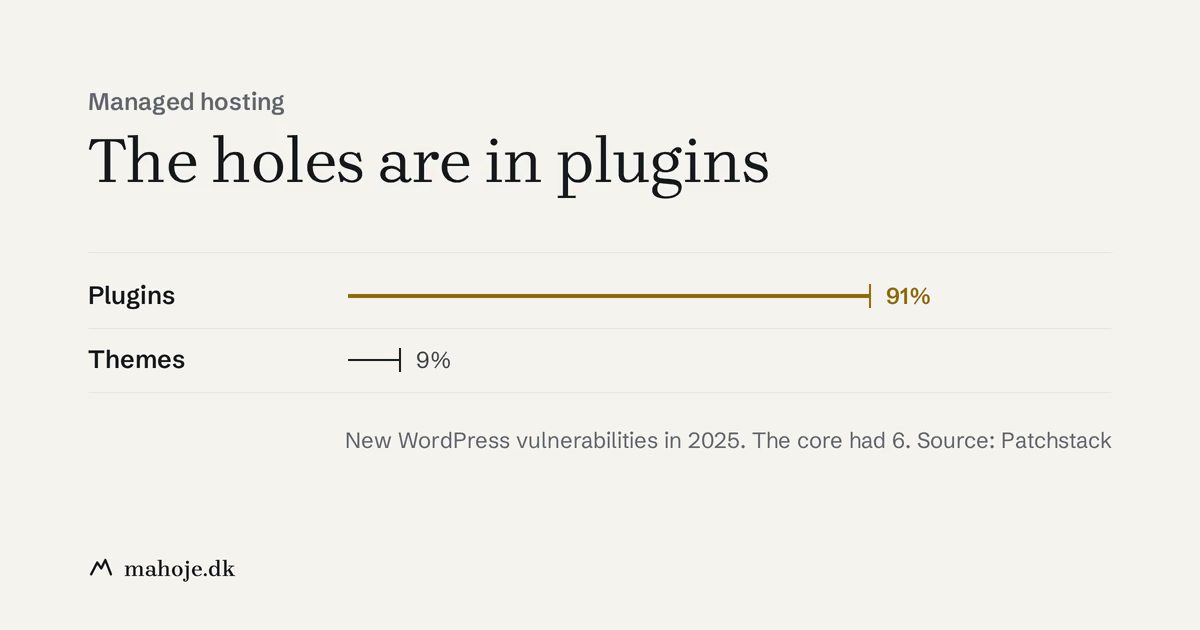
- The vulnerabilities are in plugins. 91 per cent of the new vulnerabilities in the WordPress ecosystem in 2025 were in plugins and 9 per cent in themes. The core had 6 (Patchstack).
- Your host's defences don't stop everything. In Patchstack's tests, common security solutions such as firewalls blocked 12 and 26 per cent of the attacks on known WordPress vulnerabilities (Patchstack).
- Ask about the PHP version. WordPress recommends PHP 8.3 or newer (WordPress.org), and PHP 8.2 only receives security fixes until the end of 2026 (PHP.net).
- Hosting is not operations. Someone still has to update, test, keep an eye on things and respond when something goes wrong.
Three layers, three responsibilities
It is easiest to understand what hosting covers if you think of your site as three layers on top of each other.
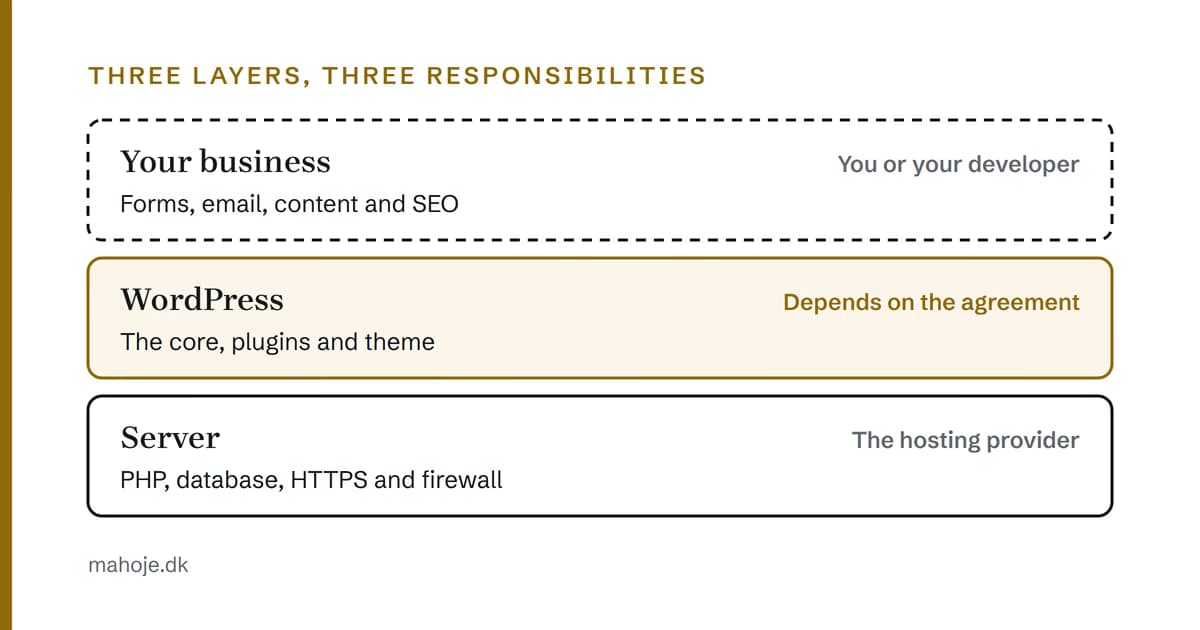
The server is the hosting provider's territory. This is where PHP, the database, the HTTPS certificate and any firewall live. It is what you always pay for.
WordPress is the middle layer: WordPress itself, your plugins and your theme. This is where responsibility gets unclear. Some hosts update the core and plugins for you, others do nothing beyond what WordPress does by itself. It is this layer that separates managed hosting from ordinary shared hosting, and that is why this is where you need to read the agreement carefully.
Your business is the top layer: that the contact form passes messages on, that email works, that the content is correct, and that the site can be found in Google. No hosting provider takes care of that, and it is often here that problems are discovered too late.
What WordPress handles by itself
Part of what people think they are paying a host for, WordPress already does by itself.
Minor core updates happen automatically on most sites. Since WordPress 5.6, new installations have also had automatic updates switched on for major versions, while older installations keep the old setting unless an administrator switches it on (WordPress.org).
Plugins and themes are only updated automatically in special cases decided by WordPress.org (WordPress.org). Otherwise an administrator has to switch on automatic updates plugin by plugin and theme by theme. That option has existed since WordPress 5.5. When it is switched on, WordPress runs the updates twice a day and sends an email with the result (WordPress.org).
There are two caveats. The updates rely on WordPress's scheduled tasks, and depending on the server, the installation and the plugins, they don't always run as expected (WordPress.org). And an update that runs is not the same as a site that works afterwards. Neither of them notices that the contact form has stopped sending.
Under Tools and Site Health in WordPress you can see for yourself whether background updates work, whether the PHP version is outdated, and whether there are plugins waiting to be updated (WordPress.org). It is a good place to start before you talk to your host.
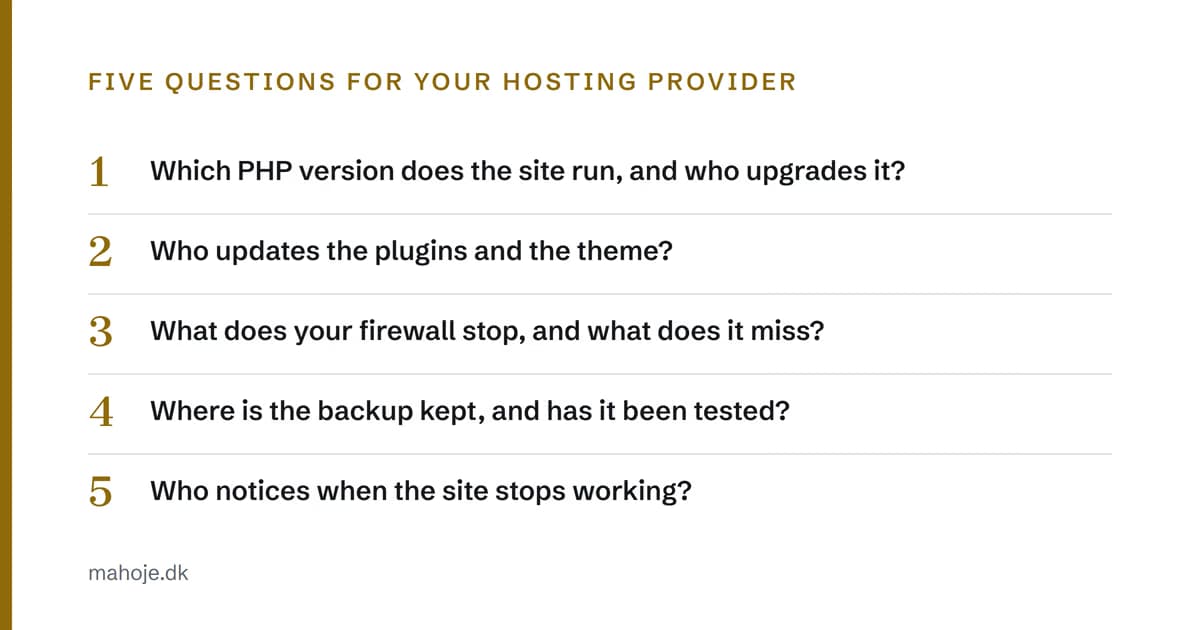
Question 1: Which PHP version does the site run on?
PHP is the language WordPress is written in, and it is the host that decides which versions you can choose. WordPress recommends PHP 8.3 or newer. WordPress also works with PHP 7.4, but the older versions are no longer maintained and may expose the site to security vulnerabilities (WordPress.org).
Each PHP version gets bug fixes for two years and then only security fixes. According to PHP.net, this is how it looks today:
- PHP 8.2 receives security fixes until 31 December 2026.
- PHP 8.3 receives security fixes until 31 December 2027.
- PHP 8.4 is fully supported until 31 December 2026 and receives security fixes until 31 December 2028.
- PHP 8.5 is fully supported until 31 December 2027.
Ask your host who switches the PHP version when the old one expires. If they do it automatically, ask who tests the site afterwards. A switch can make an old plugin stop working, and fixing that is rarely the host's job.
Question 2: Who updates the plugins and the theme?
This is the most important question, because this is where the risk is. Patchstack, which collects vulnerabilities in WordPress, counted 11,334 new vulnerabilities in the WordPress ecosystem in 2025, 42 per cent more than the year before. 91 per cent were in plugins and 9 per cent in themes. Only 6 were found in WordPress itself (Patchstack).
Two figures from the same report make it clear why it is urgent. From the moment a vulnerability was published until Patchstack saw the first attempt to exploit it, 5 hours passed. The figure is a weighted median, where the most attacked vulnerabilities count the most. And 46 per cent of the vulnerabilities had not been fixed when they were published (Patchstack). So updating once a month is not enough, and updating is not always enough either, because sometimes no update exists yet. Then the plugin has to be switched off or protected in some other way, and that requires someone to know which plugins the site runs.
Ask your host:
- Do you update plugins and themes, or only WordPress itself?
- What do you do if an update takes the site down?
- Will I be told if one of my plugins has a known vulnerability with no fix?
Question 3: What does your firewall stop?
Many hosts put a firewall or other protection in front of the site. That is good, but it is not a substitute for updates. In 2025 Patchstack ran two tests in which they attacked sites through known WordPress vulnerabilities and measured how much common security solutions, such as hosts' own firewalls and Cloudflare, stopped. In the first test, 12 per cent of the attacks were blocked. In a broader test with more vulnerabilities, 26 per cent were blocked (Patchstack).
That doesn't mean your host's firewall is worthless. It stops a lot of other noise. But it rarely knows the specific flaws in your plugins, and so it is not an answer to question 2. If the site has already been hit, see my page on hacked WordPress sites.
Question 4: Where is the backup kept, and who has tried restoring it?
Almost all hosts take backups. The question is where, and whether they can be used. A WordPress backup must contain both the files and the database, otherwise you can't fully restore the site. WordPress's own documentation recommends keeping 3 to 5 recent backups with copies in different places, for example one on the server, one in the cloud and one on your own computer (WordPress.org). It also recommends taking a manual backup now and then to make sure the automatic ones work.
If all copies sit with the same host, you in practice only have one place. If the account closes or is compromised, the backup can disappear with it. So ask:
- How many days do you keep backups, and are they stored outside the server itself?
- Can I download a complete copy of the files and database myself?
- How long does a restore take, and does it cost anything?
If you want to go deeper, I have written a guide to backing up WordPress.
Question 5: Who notices when something goes wrong?
The last question is the one most often left unasked. The host keeps an eye on the server. But if an update breaks the contact form, email from the site doesn't arrive, or the front page shows an error in one browser, the server is still up, and the host sees nothing.
That is the difference between hosting and operations. Hosting keeps the server running. Operations means someone is responsible for the site itself working, and that problems are spotted before a customer spots them.
When is the hosting provider enough?
Ordinary shared hosting or a managed solution is fine when the site is small, has few plugins, and there is a person who actually has the time and inclination to:
- update plugins and the theme, and test the site afterwards
- keep an eye on Site Health in WordPress
- take and test backups
- send a test message through the form now and then
If there is no such person, it is not the hosting that is missing. It is the operations. That is where most smaller businesses are: the site was built, and then nobody owned it afterwards.
When you want someone who is responsible
That is the job I take on with my operations packages. They are not hosting. Your site stays with your host, and the hosting account and the domain are yours. I take care of the middle layer and everything connected to it.
The smallest package, Micro, costs DKK 2,500 per month excl. VAT and covers updates of WordPress, plugins and theme, daily backup, round-the-clock uptime monitoring, security hardening and a monthly report. Light at DKK 5,000 per month adds ongoing security scanning and help with incidents, and Drift+ at DKK 10,000 per month gives you three hours of improvements every month. All levels are on the pricing page.
If you are thinking about switching host, I have written about how to choose WordPress hosting, and about how to move the site without downtime. And if you first want to know how your site is doing, you can run the free website check (in Danish). Among other things, it shows HTTPS, security headers and speed, wherever the site is hosted.
Frequently asked questions
What is managed WordPress hosting?
Hosting where the provider takes care of more than the server itself, such as updating WordPress, backups, caching and a firewall. There is no shared definition, so it is the provider's own description and agreement that decide what you get.
Does my host update my plugins?
It depends on the agreement. WordPress updates minor versions of the core by itself, but plugins and themes are only updated automatically if someone has switched it on for each one, or in special security cases. Ask your host directly, and also ask who tests the site afterwards.
Is my host's firewall enough to protect my WordPress site?
No, not on its own. Patchstack tested common security solutions, such as hosts' own firewalls and Cloudflare, against attacks on known WordPress vulnerabilities. In one test they blocked 12 per cent of the attacks, and in a broader test 26 per cent. Updates and someone keeping an eye on things are still necessary.
Which PHP version should my WordPress site run on?
WordPress recommends PHP 8.3 or newer. PHP 8.2 only receives security fixes until 31 December 2026, so if your site runs on 8.2 or older, it is time to plan an upgrade with your host.
Is my host's backup enough?
It is a good start, but if it sits on the same server or with the same provider, it is only one copy in one place. WordPress recommends 3 to 5 recent backups in different places. And a backup only counts once you have tried restoring it.
When is ordinary shared hosting enough?
When the site is small, has few plugins, and there is a person who has time to update, test and keep an eye on it. If nobody has that responsibility, it is not the hosting that is missing, but the operations.
Sources
All sources were read on 2 October 2026.
- WordPress.org: Requirements: wordpress.org
- WordPress.org: Upgrading WordPress (automatic background updates): developer.wordpress.org
- WordPress.org: Plugin and themes auto-updates: wordpress.org
- WordPress.org: Site Health screen: wordpress.org
- WordPress.org: Backups: developer.wordpress.org
- PHP.net: Supported Versions: php.net
- Patchstack: State of WordPress Security in 2026: patchstack.com