"We're too small to be a target." That is the most widespread misconception I come across when the conversation turns to IT security in smaller businesses. And it is a dangerous one.
Most attacks are automated. Bots scan the internet around the clock for known vulnerabilities. They don't check your turnover first. They find holes in a WordPress installation, a plugin, a server or a form and exploit them at scale. The Danish Agency for Civil Protection (Styrelsen for Samfundssikkerhed) puts it drily: Danish authorities, businesses and citizens are exposed to cyberattacks every day (Styrelsen for Samfundssikkerhed, in Danish).
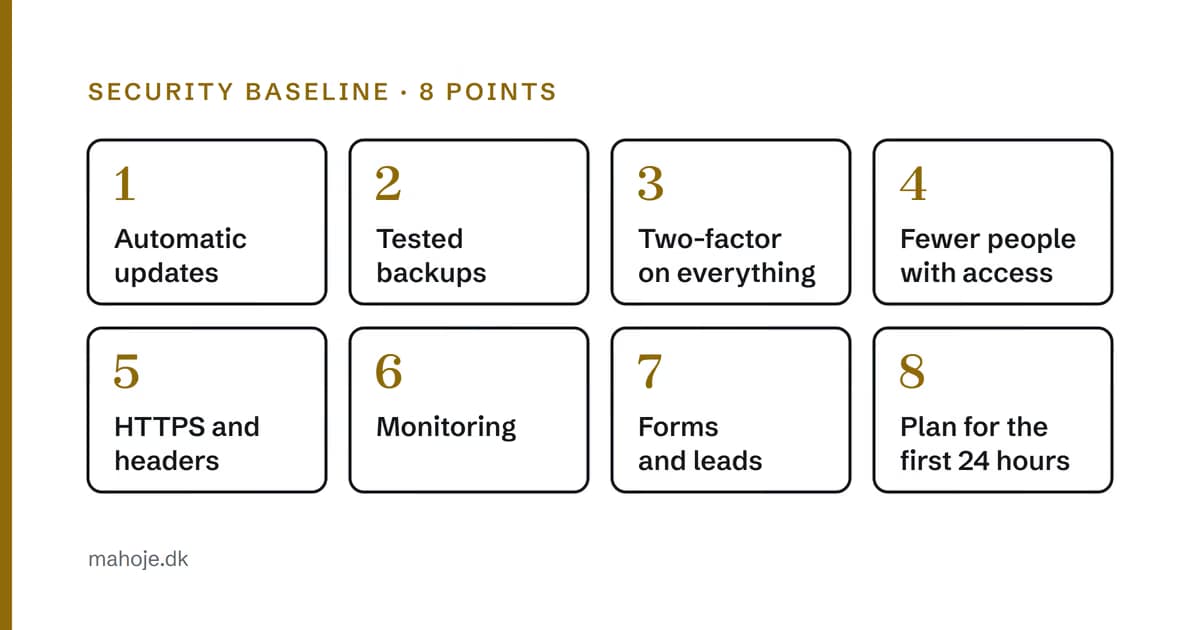
The good news is that you don't need a compliance programme to be in good shape. The vast majority of attacks are stopped by a baseline that is boring, cheap and almost entirely automatable. Here are the eight points I work from, and what the authorities themselves recommend. The sources are linked in the text and collected at the bottom.
In brief
- Small businesses are a target, because the attacks look for holes, not names. 31 per cent of the breaches Verizon examined started with a software vulnerability (Verizon DBIR 2026).
- The basics are the same everywhere: updates, backups, two-factor login, control of access and security requirements for your supplier (sikkerdigital.dk, in Danish).
- Two-factor login is the most effective single measure: it reduced the risk of account takeover by 99.22 per cent in Microsoft's study (Microsoft Research).
- The hard part isn't the setup, but keeping it running year after year. That is why someone has to own it.
- Make a plan for the first 24 hours before you need it. If personal data is involved, you have 72 hours to report the breach (GDPR, Article 33).
A baseline is not the same as enterprise security
The terms get used interchangeably, so let me separate them.
Enterprise security is about compliance, ISO certification, audit reports, zero trust architecture and in-house security teams. It makes sense when you have hundreds of employees, customer contracts that require it, and data the authorities keep an eye on.
A baseline is about closing the holes the bots are looking for. The UK government calls its version Cyber Essentials and describes it as the minimum standard for organisations of all sizes, protecting against the most common threats online. It consists of five technical controls: firewalls, secure configuration, security update management, user access control and malware protection (NCSC).
In Denmark, the Danish Agency for Civil Protection and a number of partners collect the advice on sikkerdigital.dk (sikkerdigital.dk, in Danish). Their seven tips for businesses are:
- Get an overview of important data and systems.
- Update software continuously.
- Buy antivirus and a firewall.
- Back up your data.
- Learn to spot suspicious emails.
- Create strong passwords and use two-factor login.
- Set security requirements for your IT supplier.
My eight points below cover the same things, but with a focus on what I see in smaller businesses: the website, email, the domain and the accounts connected to them.
Why the baseline works
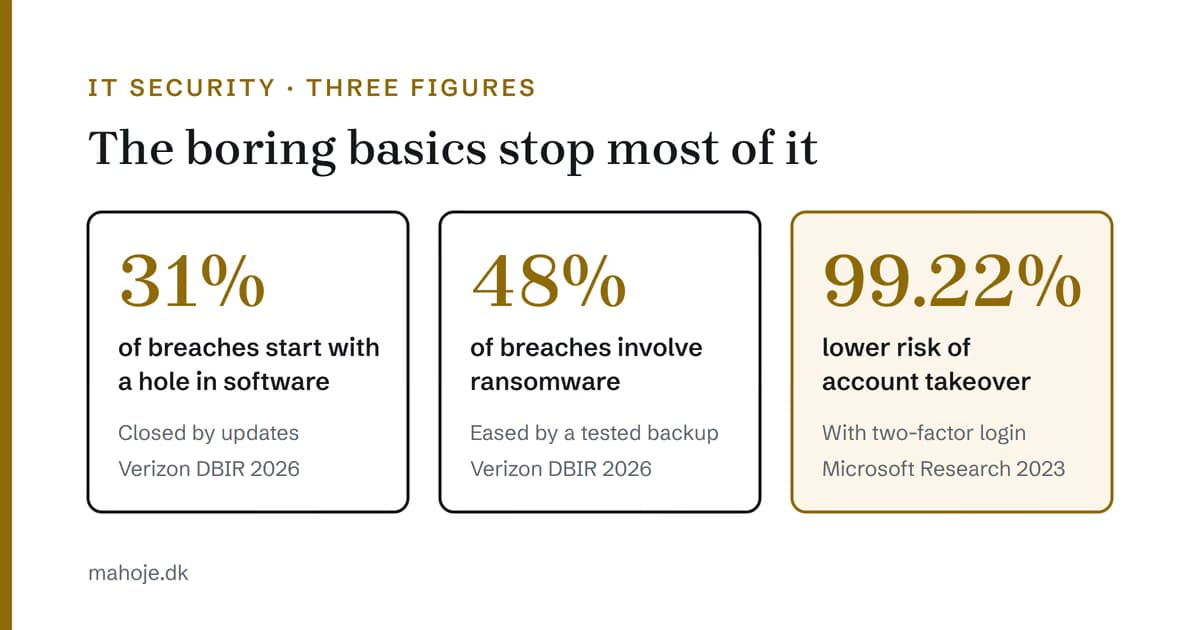
Three figures show why the boring things are the important ones:
- 31 per cent of the breaches in Verizon's 2026 report started with a software vulnerability. That is now a more common way in than stolen passwords (Verizon DBIR 2026). The answer is updates.
- 48 per cent of the breaches involved ransomware, i.e. attacks where data is encrypted or stolen and held hostage (Verizon DBIR 2026). The answer is a backup that is stored somewhere else and can be restored.
- 99.22 per cent lower risk of an account being taken over when two-factor login is switched on. Microsoft Research showed this in a study of business accounts. Even when the password had already been leaked, the risk was 98.56 per cent lower (Microsoft Research).
None of the three requires expensive products. They require someone to do them, and to keep doing them.
The 8 points
1. Updates that run without anyone having to remember them
Known vulnerabilities in outdated plugins, themes and software are the most common way in. Not because the holes are advanced, but because nobody has updated anything for over a year.
Baseline: updates run on a fixed schedule, automatically where it is safe and manually with testing where it isn't. And most importantly: something records it when an update is skipped.
2. Backups you have proven can be restored
A backup that has never been tested is a hope. It can fail silently for months, and you typically only find out on the day you need it.
Baseline: automatic backups at least daily, stored away from the server, because ransomware happily encrypts any backups it can reach. And a restore test at a fixed interval. If you have a WordPress site, I have written a guide to backing up WordPress.
3. Two-factor login on everything that can hurt you
Admin login, hosting account, domain registrar and email. A leaked password is still the easiest way in, and password reuse turns one leak into ten.
Baseline: two-factor login on all administrator accounts, especially the domain and email. If you lose control of the domain, you lose the website and the email in one go. Use an authenticator app rather than SMS where possible. In Microsoft's study, apps protected better than SMS, but both were far better than nothing (Microsoft Research).
4. Fewer people with keys
Who has administrator access to your systems today? If the answer is "maybe the old webmaster, and then Jan, but he's left", this is your biggest hole.
Baseline: one overview of who has access to what, access removed the same day a person leaves, and personal accounts instead of shared logins. It is also the first of the seven Danish tips: get an overview of important data and systems (sikkerdigital.dk, in Danish).
5. HTTPS and security headers
HTTPS is a minimum today. But headers such as Content-Security-Policy, X-Frame-Options and Strict-Transport-Security are still missing on many smaller sites, and they shut out whole classes of attack, e.g. injected scripts and clickjacking, where your page is invisibly embedded in another page.
Baseline: HTTPS enforced, security headers set on the server, and forms that send data encrypted. The free website check (in Danish) shows which headers your site is missing.
6. Monitoring: would you know if it went down?
Here is the question that makes most people go quiet: how long would it take before you discovered that the site had been hacked or was down?
Without monitoring, the answer is typically "until a customer complains". A site that sends spam in your name, or that Google has flagged as dangerous, costs more in trust than the repair itself.
Baseline: uptime monitoring that alerts you within minutes, and monitoring of logins that catches suspicious attempts.
7. Forms and leads: the door both in and out
The contact form is a risk in both directions. Coming in: spam and attempts to misuse the server. Going out: enquiries disappear if the form fails without saying so.
Baseline: spam protection, server-side validation and a check that the submission actually succeeded, with an alert when it doesn't. If you have a WordPress site where the messages don't arrive, I have written about what you can check. Lost enquiries are the most expensive failure, because nobody sees it happen.
8. A plan for the first 24 hours
It can still go wrong. The difference between an incident and a disaster is whether you have to improvise while the site is sending phishing to your customers.
Baseline: a one-page document. Who do you call? Where are the backups, hosting and logins? How do you take the site offline? Who needs to be informed?
Remember the legal part. If personal data is compromised, the breach must as a rule be reported to the data protection authority (in Denmark, Datatilsynet) without undue delay and, where feasible, no later than 72 hours after you became aware of it (GDPR, Article 33). The 72 hours are easier to meet when the plan is already in place.
Set requirements for your supplier
The last of the seven Danish tips is to set security requirements for your IT supplier (sikkerdigital.dk, in Danish). It is worth taking seriously, because most businesses outsource a lot of their security. Statistics Denmark (Danmarks Statistik) found in 2025 that 68 per cent of businesses with at least 10 employees used external suppliers for IT security, while about 60 per cent had their own staff for it (Danmarks Statistik, in Danish).
When a supplier is responsible, ask concrete questions:
- Who updates what, and how often?
- Where are the backups, and when was a restore last tested?
- Who gets notified when the site goes down, and how quickly?
- Who has administrator access, and do they use two-factor login?
- What happens if we end the collaboration? Do we get all access and data with us?
If the supplier can't answer clearly, that is your answer.
Why it still doesn't get done
Not because the points are difficult. Most of them can be set up in a few days. The problem is something else:
- Nobody rewards you for it. Security is only noticed when it is missing.
- It takes persistence. The setup is one thing. Keeping it running in year three is another.
- Nobody has it as their job. So it is everyone's responsibility, and therefore no one's.
It is the same mechanism as technical debt: cheap to prevent, expensive to clean up, and it grows quietly in the background.
What AI changes
Ongoing security maintenance has been expensive because it takes persistence: scanning, patching, testing, monitoring and reporting, every week. It is routine work, and routine work is what AI has made cheaper to carry out.
In my own operations work, this means that scans for known vulnerabilities can run on every change instead of once a year, that anomalies in logs and uptime are flagged immediately, and that testing an update goes faster.
AI can't take over the judgement: what is a real threat to your particular business, and what is noise. But carrying out the basics has become so cheap that "we can't afford it" rarely holds up.
The numbers
Compare three ways of doing it:
- Do nothing. DKK 0 a month, until the day the site is hacked, the enquiries disappear or Google shows a warning. Then the bill for clean-up, lost trust and lost traffic arrives all at once.
- Set the baseline up once and let it look after itself. That holds for a while. Then updates and tests slip behind, and you are back in scenario 1, just with a false sense of security.
- Ongoing maintenance with the baseline as the foundation. With me, Micro costs DKK 2,500 a month excluding VAT and covers updates, daily backups with restore tests, round-the-clock uptime monitoring and a monthly report. Light costs DKK 5,000 and Drift+ DKK 10,000. All levels are on the pricing page.
Frequently asked questions
What matters most in IT security for a small business?
That the basics are in place and stay that way: updates, backups that have been tested, two-factor login on the important accounts and an overview of who has access to what. The seven tips from the Danish Agency for Civil Protection (Styrelsen for Samfundssikkerhed) and the UK Cyber Essentials standard point to the same things.
Are small businesses even a target for hackers?
Yes. Most attacks aren't aimed at a particular business, but at known holes that bots look for everywhere. Verizon's 2026 data breach report shows that 31 per cent of breaches started with a software vulnerability, and the Danish Agency for Civil Protection writes that Danish businesses are exposed to cyberattacks every day.
Does two-factor login really help?
Yes, a lot. A Microsoft Research study of business accounts found that two-factor login reduced the risk of an account being taken over by 99.22 per cent. An authenticator app protects better than SMS, but both are far better than a password alone.
What do we do if we get hacked?
Follow your plan for the first 24 hours: who to call, where the backups and logins are, and how to take the site offline. If personal data is involved, the breach must as a rule be reported to the data protection authority (in Denmark, Datatilsynet) no later than 72 hours after you became aware of it, under Article 33 of the GDPR.
What does ongoing security maintenance of a website cost?
With me, maintenance starts at DKK 2,500 a month excluding VAT for Micro, with updates, daily backups with restore tests, uptime monitoring and a monthly report. Light costs DKK 5,000 and Drift+ DKK 10,000. All levels are on the pricing page.
Related articles
- WordPress Security in 2026: The 10 Attacks You Need to Know
- Technical debt: the bill always arrives
- WordPress Backup Guide: How to Protect Your Website
- Your business needs a CTO, just not full-time
Sources
All sources were read on 2 October 2026. Sources marked "in Danish" are only available in Danish.
- Danish Agency for Civil Protection (Styrelsen for Samfundssikkerhed): Cybertruslen mod Danmark (The cyber threat against Denmark, 25 November 2025), in Danish: samsik.dk
- sikkerdigital.dk: De syv råd om IT-sikkerhed (The seven tips on IT security), in Danish: sikkerdigital.dk
- sikkerdigital.dk: Om sikkerdigital.dk (About sikkerdigital.dk), in Danish: sikkerdigital.dk
- Verizon: 2026 Data Breach Investigations Report: verizon.com
- Microsoft Research: How effective is multifactor authentication at deterring cyberattacks? (2023): microsoft.com
- National Cyber Security Centre (UK): Cyber Essentials overview: ncsc.gov.uk
- Statistics Denmark (Danmarks Statistik): Flere virksomheder varetager egen it-sikkerhed (More businesses handle their own IT security, 5 September 2025), in Danish: dst.dk
- General Data Protection Regulation (EU) 2016/679, Article 33, English version: eur-lex.europa.eu
