Technical debt: the bill always arrives — and it grows with compound interest
Imagine your business bought a machine that was vital to production. It runs every day, but you never change the oil. You don't replace worn parts. You leave the little warning lights on, because "it still works".
Most small business owners would call that madness. But they do exactly the same with their website and digital systems — every single day.
What technical debt actually is
Technical debt is everything you should have done, but didn't. It is:
- The WordPress version that is three releases behind, because "something broke last time"
- Plugins that haven't been updated in two years, because they still work
- The quick CSS fix that was thrown in instead of the proper solution
- The email form that doesn't handle errors correctly — which means customer enquiries vanish without a trace
- The code that works fine, but which nobody else dares touch because they don't understand it
- The site that takes 4 seconds to load because nobody has cleaned out old scripts
Every one of them is a small loan. And just as with real loans: the longer you wait to pay, the more it costs.
The debt spiral — harder on small businesses than on large ones
Large companies have a whole IT team to spread technical debt across quite a few people. They have the budget to set aside a week for "technical improvements" a couple of times a year.
Small businesses have one person — usually the owner — who also has to run the business, sell, deliver and wrestle with the bank.
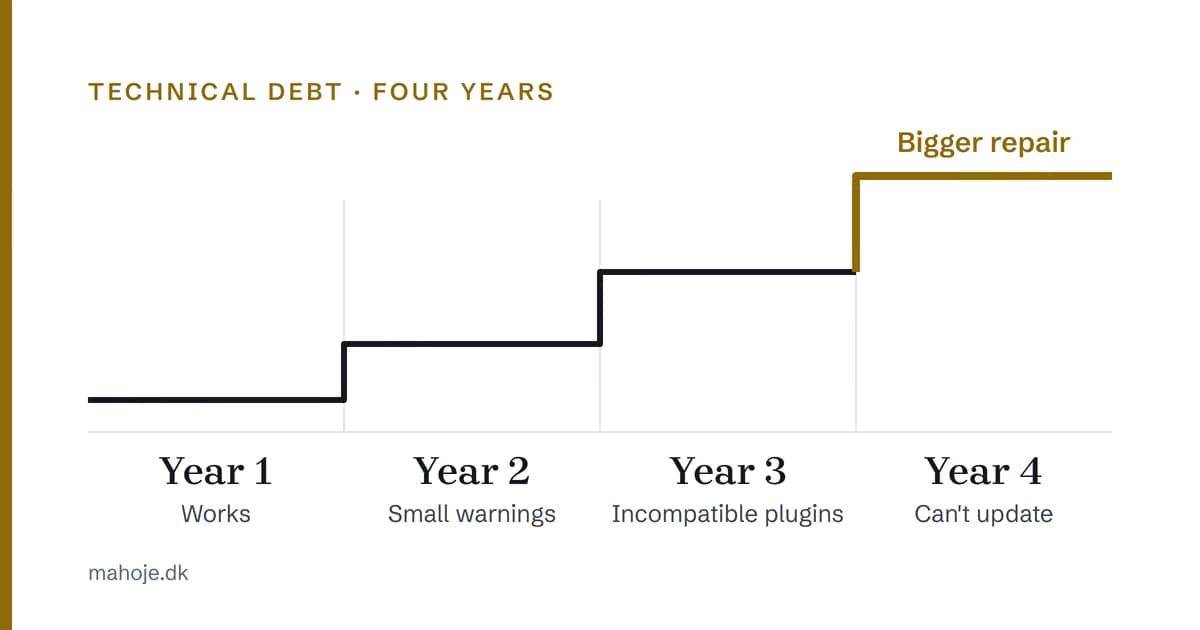
The result: technical debt accumulates faster, because there is never time to pay it down. Every year you wait, the loan gets more expensive:
| When | What happens |
|---|---|
| Year one | The site works. You don't notice anything. |
| Year two | Updates take longer. Small warnings start appearing. |
| Year three | Plugins become incompatible. Something stops working after an update. You consider switching platform. |
| Year four | An awkward plugin or a known vulnerability means you can no longer update. The repair becomes bigger than the ongoing maintenance would ever have been. |
That is the pattern I often take over: what started as "we'll fix that next month" in year 1 ends up as a rushed repair in year 4, because one plugin has finally spread a problem that was hidden all along. I can't document an average amount for it, because it depends entirely on how deep the debt goes — but the difference between "repair it in an hour" and "can't update because backups and access are unclear" is the biggest single item on the bill.
The 4 most expensive forms of technical debt in small businesses
1. An outdated CMS or platform
If your website runs on a CMS that no longer receives security updates, it isn't just old — it is a liability. WordPress says so itself in Hardening WordPress: older versions are no longer maintained with security updates, and when a vulnerability is discovered and patched, old versions are more exposed — because information about the exploit is usually publicly available.
At the same time, WordPress stresses that your hosting is not responsible for the application you have chosen to install. Infrastructure and debt are two different bills.
Solution: be on a platform that is actively maintained, and keep it up to date. WordPress has had automatic updates since version 3.7, so "updates take too long" is usually a matter of someone having switched them off.
2. Untested backups
"We have backups" is one of the most dangerous sentences in a small business. WordPress recommends taking regular snapshots of the whole installation — files and database — and storing them somewhere trustworthy. But a backup without proof that it can be restored is a backup you don't have.
Look at what typically fails once the site is on fire:
- The backup hasn't run for months, because a change on the server killed the cron script
- The restore requires a PHP version your hosting no longer supports
- The backup only contains the database — not the files, or the other way round
Solution: test your backup. Set a calendar reminder once a month: restore to a test environment. In the hardening guide, WordPress also points to data integrity: encrypt the backup, and keep an independent record of hashes, so you can see whether files have been changed. If the restore works, you're golden. If not, you have just saved yourself a huge bill.
3. No documentation
The person who built your website left two years ago. The code has no comments. The passwords are on a Post-it note under the keyboard of the person who left. The login for the hosting only exists as a deleted email.
When something breaks, you start from scratch — hours of digging to work out how things fit together. And you pay a developer to get to know your own site.
Solution: use a password manager (Bitwarden, 1Password), and switch on two-step verification for your WordPress login. WordPress recommends it directly, because access to an administrator account gives access to the whole server. Document the server setup, domains, DNS and critical access in one place. Share it with exactly the people who need it.
4. "It works, so leave it alone"
The most insidious form. The site works. It doesn't let you down. But every year you don't update, you are building on a stack of compromises that will topple one day.
Solution: technical maintenance isn't an expense — it is insurance. It makes sure your site is up, secure and fast. If you skip it, you save the monthly maintenance — and end up with an urgent repair instead, which costs more because the choices are no longer yours. On this site, ongoing maintenance starts at DKK 2,500 a month; a website check with an overview and a prioritised roadmap is DKK 9,000. See the packages for the full pricing structure.
How AI makes the clean-up cheaper
In my experience, a manual review of a website for technical debt is a day's work: logging in, inspecting plugins, checking security, measuring speed, reading logs and writing a report.
Today I use AI for:
- Automated review: scan the whole site for outdated packages, known vulnerabilities and configuration errors in minutes
- Code analysis: find incompatible plugins, deprecated function calls and security holes in custom code
- Log analysis: see errors as patterns — a form that loses enquiries during narrow time windows, an image that crashes on upload
That makes the review cheap enough to repeat, so it becomes part of ongoing maintenance rather than a one-off repair. The AI reviews and sorts; the decision and the responsibility are still mine.
How to break the spiral
If you recognise yourself in the above, the way out is fairly straightforward — but it requires you to take the first step:
- Get an overview. What is running? When was it last updated? Are there backups? Get an honest set of answers.
- Close the holes. The critical ones — security, backups, documentation — are dealt with first. Everything else can wait a week.
- Make a plan for the rest. Technical debt is paid off in instalments. Prioritise what gives the most value for the fewest hours.
- Make sure it doesn't happen again. Ongoing maintenance costs far less than an emergency rebuild. Set up a system that keeps you up to date — automatically.
The audit checklist: eight checks you can run yourself
The four areas above are the diagnosis. Here is the concrete checklist I go through a site with myself. Tick off the ones you can answer yes to — the rest is your debt.
1. Runtime and requirements
- Does WordPress run on PHP 8.3 or newer, MariaDB 10.11+/MySQL 8.0+ and HTTPS? That is what WordPress itself recommends. Older versions are officially end-of-life and can leave you with security holes.
- Is WordPress core updated to the latest version?
2. Themes and plugins
- Are all plugins updated, and have they been updated since the last core update? According to WordPress's own plugin documentation, a plugin that hasn't been updated since the latest core release may be incompatible or have unknown compatibility.
- Have unused plugins been deleted, not just deactivated?
- Have you checked
wp-content/mu-plugins? Must-use plugins don't show up in the plugin list and can only be removed by deleting the file.
3. Update status
- Can you click "Update now" without being afraid of the consequences?
- Are automatic updates switched off, and do you know why?
- Do you have a recent copy of the database before you update?
4. Backup
- Do you regularly take snapshots of both files and database, and are they stored outside the web root?
- Has the latest backup been verified, not just shown as green in the overview?
5. Restore test
- Have you restored a backup recently, and do you know how long it took? A backup that has never been tested is a backup you don't have.
6. Access
- Do you know all the active admin accounts, and are you the only one with access to hosting and the domain?
- Is two-step verification switched on, and does every account use its own strong password in a password manager?
7. Forms and the lead route
- Have you submitted your own contact form recently and actually received a confirmation?
- Is there an error log you have actually looked at, so a failing form can't stay hidden for a month?
8. The next concrete owner action
- Do you have one named point in time when something happens — who, what and by when? Otherwise it isn't a plan, it is an intention.
Prioritise the findings: P0 to P3
Once the list has been worked through, the question is not "what is wrong" but "what do I do first". I prioritise in four levels — and the framework is my own editorial synthesis, not a WordPress standard:
| Level | What belongs here | Why first |
|---|---|---|
| P0 — urgent | Active downtime, errors on the enquiry route, known compromise, or a backup that doesn't exist or can't be restored | Damage is happening now, and every day makes it more expensive |
| P1 — security | Core/PHP/database/HTTPS below the minimum, outdated plugins, unused plugins left lying around, old administrator login without two-step verification | Reducing risk while you can still choose for yourself |
| P2 — recovery and monitoring | Untested backups, no error log, no documentation, no handling of access and passwords | Makes the next failure quicker to spot and easier to get out of |
| P3 — performance and hygiene | Slowness, old scripts, hidden CSS fixes, technical SEO | Measured and optimised once the three levels above are closed |
The order matters more than the list. A P3 speed optimisation on a site with a P0 missing backup is wasted work.
Keep, repair or modernise?
Once the debt has been mapped, the decision is typically one of three:
- Keep. Close to core, updated, backups verified. The debt is superficial — tidy up and stop changing things.
- Repair. There are concrete holes, but the architecture holds. It is the cheapest choice and the one most small businesses should start with.
- Modernise. The foundation itself no longer holds: more plugins than the solution is worth, or a PHP/database upgrade is required that can't be done without downtime. Newer WordPress requires PHP 8.3+, MariaDB 10.11+/MySQL 8.0+ and HTTPS, so this is where an old installation often ends up.
If you can't say which of the three your site is, that is exactly what an audit needs to answer.
Get a concrete answer: a fixed-price website check with a prioritised roadmap
Fixed price, 5–7 working days. You get an audit + overview, a prioritised roadmap (impact/effort) and a recommended next step — not a 40-page report.
Sources
The specific requirements and recommendations in this article are taken from WordPress's own documentation and were checked on 25 September 2026:
- Requirements — PHP 8.3+, MariaDB 10.11+/MySQL 8.0+, HTTPS
- Manage Plugins — compatibility, backup before updating, delete unused plugins, must-use plugins
- Hardening WordPress — outdated versions, responsibility split between hosting and application, access accounts, two-step verification, backups, data integrity, logging and monitoring
The prices mentioned in the article are Mahope's own public prices: ongoing maintenance from DKK 2,500 a month (packages) and a security check as part of the website check at DKK 9,000.
