Many small businesses already use ChatGPT. Often it is just the employees' own accounts: a free one here, a Plus subscription on a private credit card there. That works until someone asks who owns the conversations, what happens to customer data, and how to close access when an employee leaves.
ChatGPT Business is OpenAI's answer to that. Here I go through what the plan costs, what a business gets beyond a personal subscription, and how it compares with the two obvious alternatives: Microsoft 365 Copilot and Claude Team. All prices and facts come from OpenAI's, Microsoft's and Anthropic's own pages, and the sources are collected at the bottom.
In short
- ChatGPT Business is the former ChatGPT Team. The plan was renamed on 29 August 2025 (OpenAI Help Center).
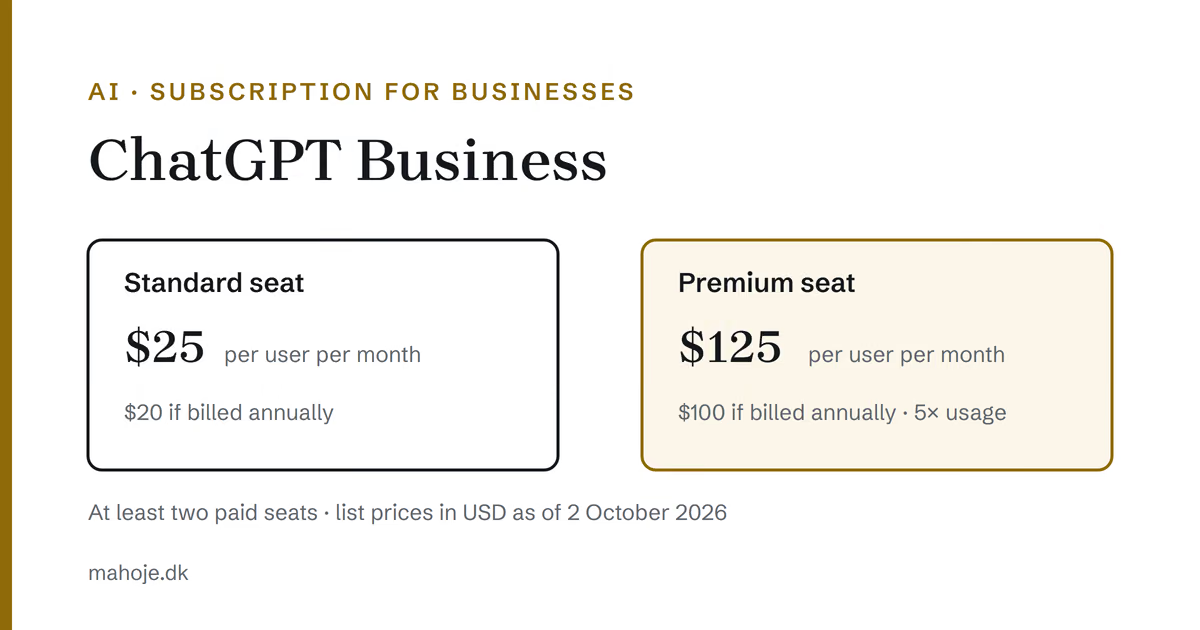
- A Standard seat costs $25 per user per month, or $20 billed annually, as of 2 October 2026. A Premium seat costs $125 or $100 (OpenAI Help Center).
- There must be at least two paid seats, and there can be at most 200 (OpenAI Help Center).
- OpenAI does not train on data from a Business workspace (OpenAI Help Center).
- Plus is for individuals, Business and Enterprise are for businesses (ChatGPT).
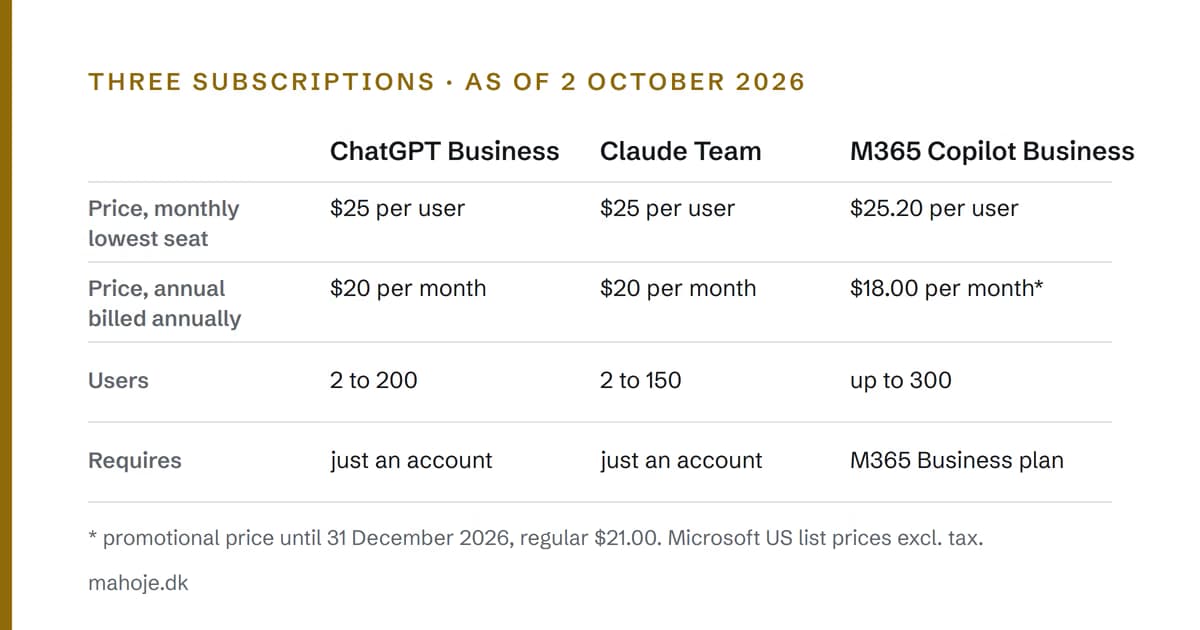
- Microsoft 365 Copilot Business requires a Microsoft 365 Business subscription to begin with. Claude Team costs the same as ChatGPT Business for a Standard seat (Microsoft, Anthropic).
What ChatGPT Business is
ChatGPT Business is a shared workspace for a team. OpenAI describes it as a self-serve plan with central billing, administration and two kinds of seats, Standard and Premium, both of which give access to ChatGPT, ChatGPT Work and Codex (OpenAI Help Center). ChatGPT Work is the part that can keep working on a task towards a goal, and Codex is OpenAI's tool for programming.
The name is new. Until the summer of 2025, the plan was called ChatGPT Team. OpenAI says the renaming in itself did not change features, price or usage limits, and that existing Team workspaces simply became Business workspaces (OpenAI Help Center). So if you have read about ChatGPT Team somewhere else, it is the same plan, but prices and seat types have changed since.
What does ChatGPT Business cost?
The price depends on the seat type and on whether you pay monthly or annually. As of 2 October 2026, the list prices are (OpenAI Help Center):
- Standard seat: $25 per user per month billed monthly, $20 per month billed annually.
- Premium seat: $125 per user per month billed monthly, $100 per month billed annually.
OpenAI says the prices are in USD and may vary by country and currency. So I don't convert them. The price you will pay is shown at checkout when you create the workspace.
A workspace must have at least two paid seats, and they can be mixed, for example one Standard and one Premium (OpenAI Help Center). The smallest possible setup is therefore two Standard seats at $25 each on monthly billing. For new subscriptions the ceiling is 200 paid seats. If you need more, OpenAI points you to Enterprise.
Standard or Premium
The difference is how much you can use. OpenAI says a Premium seat gives five times as much usage as a Standard seat and is not subject to the five-hour limit that Standard has (OpenAI Help Center). The five-hour limit means usage is measured in five-hour windows, and you have to wait once you have used up your quota in a window.
For most people in a small business, Standard is enough to start with. Premium makes sense for the one or two people who use the tool heavily all day, for example for long analyses or programming. Seats can be mixed in the same subscription, and the workspace owner can move a seat from one user to another at no extra cost.
The small print on seats
Three things are worth knowing before you buy (OpenAI Help Center):
- New seats are charged immediately for the rest of the period.
- Fewer seats only apply from the next period. If you have paid for a year, it is a year.
- Unused seats do not in themselves entitle you to a refund once the number is locked for the period.
My advice is therefore to start with monthly billing and few users. Switch to annual billing once you know how many people actually use it.
ChatGPT Business does not include access to OpenAI's API. The subscription and the API are billed separately (OpenAI Help Center). If ChatGPT is to be connected to your own systems through code, that is a separate cost.
What you get beyond Plus
OpenAI itself says on its pricing page that Free, Go and Plus are made for individuals, and that Business and Enterprise are for businesses (ChatGPT). The difference is not primarily how clever the model is. It is who owns and controls the account.
Shared administration. Business gives you a workspace with roles such as owner, admin and member, and the admins can manage users, usage and billing in one place (ChatGPT Business, OpenAI Help Center). When an employee leaves, you can remove their access and give the seat to someone else.
Data is not used for training. OpenAI says it does not train on data from a Business workspace, and that the plan is covered by OpenAI's Business Terms and its Enterprise Privacy commitments (OpenAI Help Center).
Sign-in and security. The Business page mentions encryption, single sign-on (SSO, where employees sign in with the company's own login) and two-factor authentication (ChatGPT Business). The pricing page states that data is encrypted in transit with TLS 1.2 and at rest with AES-256 (ChatGPT).
Shared projects and connections. The team can work in shared spaces with files and context, and ChatGPT can be connected to the tools you already use through plugins (ChatGPT Business).
If an employee already has a personal subscription, they can choose to merge their personal workspace into Business. OpenAI says this cannot be undone, and that you cannot pick individual conversations (OpenAI Help Center). It is worth talking about before people press the button.
When Enterprise is relevant
Enterprise is for larger organisations. The Business page mentions SCIM (automatic creation and removal of users from your user directory), role-based access and storing data in specific regions as things to discuss with the sales team (ChatGPT Business). Enterprise is bought annually, and invoice billing is agreed with sales (ChatGPT). For a business with five or twenty employees, Business is the natural starting point.
Compared with Copilot and Claude
ChatGPT is not the only option. For a small business there are two others in particular to know about: Microsoft 365 Copilot, because many already use Microsoft 365, and Claude from Anthropic, because it has an almost identical team plan.
Microsoft 365 Copilot Business
Copilot Business is an add-on to Microsoft 365. Microsoft says it can only be bought by existing Microsoft 365 customers with an eligible Business plan (Microsoft). As of 2 October 2026, it costs $25.20 per user per month on monthly billing on Microsoft's US pricing page. Paid yearly, the price is $18.00 per month, but that is a promotional price that applies from 1 July to 31 December 2026. The regular price is $21.00. All of Microsoft's prices are excluding tax (Microsoft). Microsoft's prices differ by country; in Denmark the add-on is listed at DKK 162.96 per month on monthly billing and DKK 116.40 paid yearly (regular DKK 135.80), excl. VAT (Microsoft).
Microsoft also sells bundles with Copilot built in. Microsoft 365 Business Standard with Copilot costs $23.50 per user per month paid yearly and $28.20 on monthly billing. Business Premium with Copilot costs $32.00 and $38.40 (Microsoft). I have gone through the Copilot prices and licences in more detail in Copilot pricing and licensing.
If you have Microsoft 365 for work but no Copilot licences, you can still use Microsoft Copilot Chat by signing in with your work account (Microsoft). It is a cheap way to find out whether anyone actually misses more.
Copilot's strength is that it works inside the apps you already use. Its weakness is that it requires Microsoft 365 Business, and that the sums quickly get more expensive than ChatGPT Business if you don't live in Word and Outlook anyway.
Claude Team
Anthropic's team plan is called Claude Team and is for teams of 2 to 150 people. A Standard seat costs $20 per month billed annually and $25 billed monthly, and a Premium seat with five times the usage costs $100 or $125 (Anthropic). Those are the same figures as at OpenAI.
Claude Team also has single sign-on and central billing, and Anthropic says that by default it does not train models on the team's content (Anthropic). According to the pricing page, Claude can be connected to Microsoft 365 and Outlook on the Team plan. So the choice between ChatGPT and Claude is less about price and administration and more about which of them your employees get the best results with in their own work. The only way to find out is to try.
How a small business should choose
I wouldn't start by comparing models. They change faster than you can build a spreadsheet. I would start with four questions.
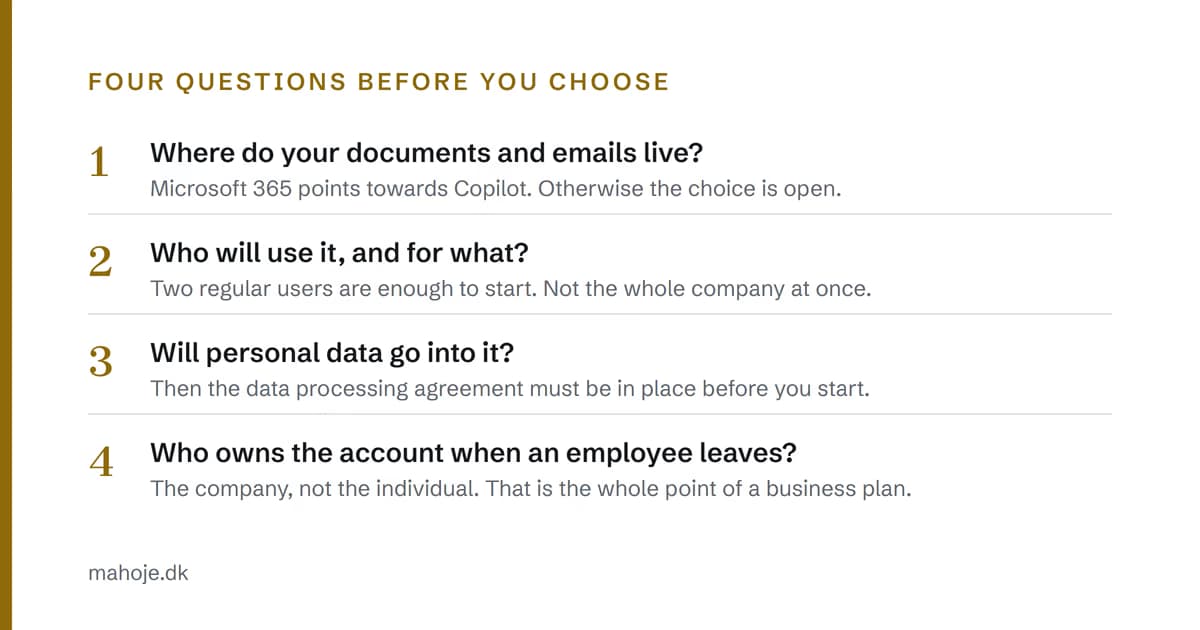
1. Where do your documents and emails live? If you live in Microsoft 365, Copilot is worth trying first, perhaps just Copilot Chat. If you use Google Workspace or a mix, ChatGPT Business or Claude Team is the more obvious choice, because they don't require a particular office suite.
2. Who will use it, and for what? Start with the two or three people who already use AI and have concrete tasks: quotes, emails, meeting notes, translations. If the tasks are really processes rather than people's own work, read about what you can automate with AI, and what it costs.
3. Will personal data go into it? If employees paste in customer emails, CVs or anything else with personal data, the supplier processes data on your behalf. Under the GDPR, a processor must work under a contract with the controller, and the Danish Data Protection Agency (Datatilsynet) says that where there is a controller–processor arrangement, it is the controller's responsibility to make sure a data processing agreement is in place (Datatilsynet, in Danish). At EU level, the European Data Protection Board explains the roles in its guidelines on controllers and processors (EDPB). Find the supplier's agreement, read it, and keep it before you roll the tool out. Datatilsynet also has a page on artificial intelligence with guidance and a regulatory sandbox (Datatilsynet, in Danish).
4. Who owns the account when an employee leaves? With private accounts, the answer is the employee. That is the real reason to pay for a business plan, and it applies to all three.
If you use AI on your website, for example a chatbot facing customers, there are also requirements in the EU AI Act.
When the subscription isn't enough
A subscription gives employees a good tool. It doesn't connect your systems. If AI is to read orders from the webshop, write to the CRM or keep an eye on something while nobody is watching, that is an integration project, and then what you need is the API and some code, not more seats.
That is where most small businesses get stuck. Not because the tool is bad, but because nobody is responsible for getting it into the daily workflows. I have written about what an AI consultant costs, and when you don't need one.
If you want one person who chooses the tools, sets them up and builds whatever needs connecting, that is exactly what I do as a technical partner. It costs DKK 15,000 per month excl. VAT with no lock-in. If it is a single, well-defined task, write to me or book 15 minutes.
Frequently asked questions
What does ChatGPT Business cost?
As of 2 October 2026, a Standard seat costs $25 per user per month billed monthly and $20 billed annually. A Premium seat costs $125 per month, or $100 billed annually. OpenAI says the prices are in USD and may vary by country and currency.
What is the minimum number of users?
Two paid seats. That can be two Standard seats or one Standard and one Premium. A Business subscription can have up to 200 paid seats. If you need more, OpenAI points you to ChatGPT Enterprise.
Is ChatGPT Business the same as ChatGPT Team?
Yes. OpenAI renamed ChatGPT Team to ChatGPT Business on 29 August 2025. Existing Team workspaces became Business workspaces without having to be moved.
Is our data used to train OpenAI's models?
Not on Business. OpenAI says it does not train on data from a Business workspace, and that the plan is covered by its Business Terms and Enterprise Privacy commitments. If personal data goes in, you still need to have the data processing agreement in order yourselves.
Can a business use ChatGPT Plus instead?
OpenAI itself says that Free, Go and Plus are made for individuals, and that Business and Enterprise are for businesses. With Plus, the employee owns the account, and the business has no shared administration, no central billing and no control over what happens to the account when the employee leaves.
Should we choose ChatGPT Business or Microsoft 365 Copilot?
It mostly depends on where your documents and emails live. Copilot Business can only be bought by businesses that already have an eligible Microsoft 365 Business subscription, and it works in Word, Excel, Outlook and Teams. ChatGPT Business doesn't require any particular office suite. Try whatever fits your daily work with two or three users first.
Sources
All sources were read on 2 October 2026.
- OpenAI Help Center: ChatGPT Business: General FAQ: help.openai.com
- OpenAI Help Center: Sign up for ChatGPT Business: help.openai.com
- ChatGPT: Pricing (Danish version of the page): chatgpt.com
- ChatGPT Business: chatgpt.com
- Microsoft: Microsoft 365 Copilot plans and pricing (US): microsoft.com
- Microsoft: Microsoft 365 Copilot plans and pricing (Denmark): microsoft.com
- Anthropic: Claude pricing: claude.com
- Datatilsynet: Roles: controller and processor (in Danish): datatilsynet.dk
- Datatilsynet: Artificial intelligence (in Danish): datatilsynet.dk
- European Data Protection Board: Guidelines 07/2020 on the concepts of controller and processor in the GDPR: edpb.europa.eu