AI automation: what you can automate, and what it costs
When you search for "AI automation", you get two kinds of answers. One is a list of tools: Zapier, Make, n8n, a chatbot, a mail bot. The other is an explanation that artificial intelligence can now "take over all repetitive work".
Both are true, and neither answers the question a small business is actually facing.
That question is: what can I make happen without me, what does it cost me, and who is liable when it goes wrong?
So this article is not a list of tools. It covers the five automations that pay off first in a business with fewer than twenty employees, the two that rarely pay off, and the part no vendor takes care of.
The short answer
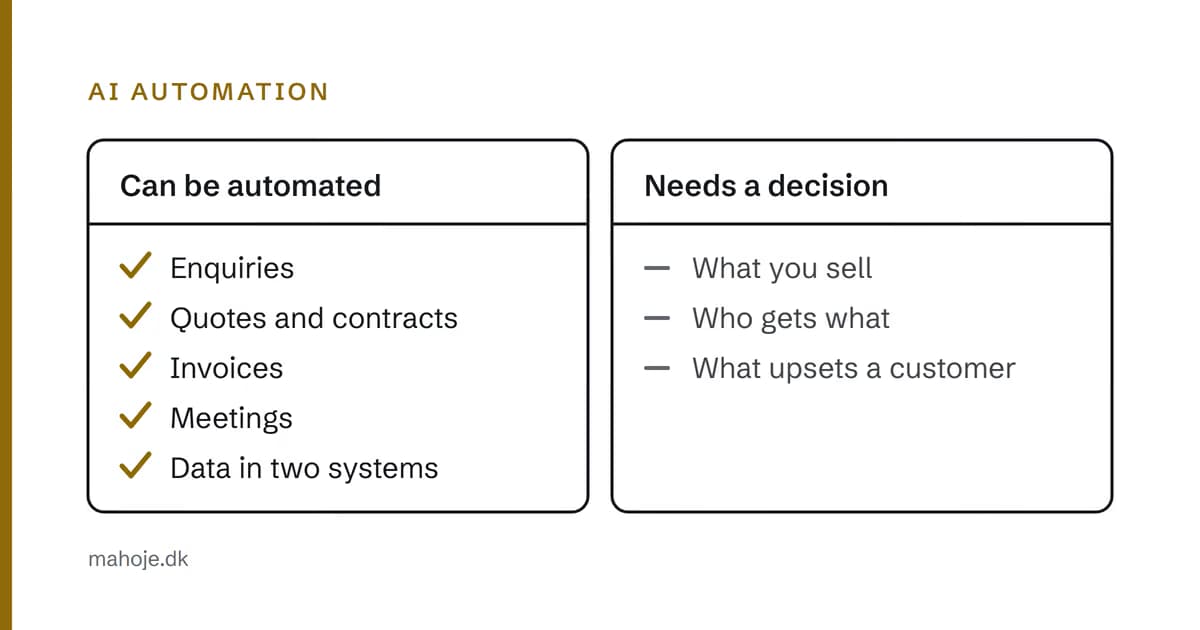
You can automate what goes in and out of the business: enquiries, documents, invoices, meetings and updates to the same data in two systems.
You cannot automate what requires a decision: what you sell, who gets what, and what makes a customer unhappy. That is not a technical limitation. It is because the decision cannot be made without knowing the business.
And that is exactly why most automations stall. They are built on the tasks that are easiest to set up, not the ones that make the biggest difference.
The five automations that pay off first
The order is not random. It is the order I build in, because each one lays the groundwork for the next.
1. Enquiries that end up somewhere
The first and most important. An enquiry from your website has to end up somewhere: a clear inbox with name, subject, source and phone number, and a receipt to the sender that tells them when they will hear back.
Sounds simple? It rarely is. The mistake that costs a small business the most is not a slow website. It is an enquiry that disappears — because it landed in a folder nobody checks, or because it was answered by an assistant that promised something you don't deliver.
The automation here is not "a chatbot that answers". It is this: you receive every single enquiry in the same system, whether it comes from the contact form, the phone or email, and you can see which ones are still open.
2. Quotes and contracts that don't start from scratch every time
A new request is often the same job with a different customer. Not exactly the same — but the same structure, the same sections, the same paragraphs that need adjusting.
This is the automation that saves the most time in a small business, because it doesn't require the AI to understand anything. It only requires that there is one draft good enough to copy.
The AI part is the smaller part. The bigger part is having one good draft that is used every time, instead of seven colleagues each building their own whenever a request comes in.
3. Invoices that get paid
To be honest, the third is the dullest, and it is the one most often already part of an ERP system. But if you send invoices manually and follow up on them manually, there is a real saving in hours here, and it involves no AI at all.
The automation worth building is not "send the invoice". It is: send the invoice, and escalate automatically to a named person after a set number of days. That escalation is the difference between an invoice paid on time and one that slips through the cracks and costs a follow-up.
4. Meetings that don't ask the same thing twice
A customer meeting where you note decisions and tasks and send them out takes twenty minutes afterwards. Automatic minutes and a task list from the conversation make that part faster.
The value is not the time. It is that the decision gets written down the same day. Far too much is lost in the week between the meeting and the minutes, because nobody quite remembered what was decided.
5. The same data in two systems
When you enter something in your CRM, the same thing should appear in your invoicing. When you update a customer's address, it should follow everywhere. When a product changes price, that price should be the same in the shop, in the quote and in the stock system.
It is the most boring automation in the world. It is also the one that causes the most errors, because it runs most often and because nobody keeps an eye on it.
The two that rarely pay off
Automating customer service before you have any. An assistant that answers questions it should have asked a human about. It gives you a more expensive conversation, because it looks like a conversation but isn't one. If your questions are uniform enough to answer automatically, they are uniform enough to answer on your website.
Automated content because it is cheap. Every page, every blog post, every product description written because it is faster than writing it properly. Google has a spam policy called "scaled content abuse", and it targets exactly this kind of content. It is cheap today and expensive in a year, because it can harm the whole domain.
The ironic part is that these two are the automations with the most marketing behind them.
What it actually costs
Here I would rather show you my own prices than invent a market average, because the figures on other sites are not comparable.
The full price structure is on the pricing page: from the level that covers the technical side and keeps it running, to the level where responsibility for the whole stack is clearly placed.
What is not in the price are the three things that are the real cost of automation, and the reason most projects die after six months:
Access. Which systems may the new solution touch? Which permissions, and from where? An automation with overly broad permissions is an automation you will one day have to switch off again.
Monitoring. It runs when you are not looking. That means someone has to look. A backup that has never been tested is a backup that won't work on the day it is needed.
Error handling. What happens when it makes a mistake — not when it is finished, but when it runs at four in the morning on a Tuesday? Who cleans up, and how quickly? Is there a way to roll back?
These three are not details. They are the difference between an automation that saves time and one that costs you a weekend and a customer.
The four questions to ask before you buy
-
What does it have access to, specifically? Not "we work securely" — which system, which permissions, from where. And: can it be switched off again?
-
What happens when it makes a mistake? Not when it is finished. Who cleans up, and how quickly? Is there a rollback that has been tested?
-
Who is liable if it goes wrong with a customer? That belongs in the agreement, not in an email reply.
-
What happens when the collaboration ends? Which data has been moved, where to, and how do you get it back?
Questions 1 and 4 decide everything. A solution you cannot switch off again is not a solution you have rented. It is one you have bought, without meaning to.
When not to automate
This is the hardest thing to sell on, so it is worth saying clearly.
If the task happens once a month, automation is almost never worth it. It takes longer to set up than it takes to do — and it suggests you have a problem you need to understand first.
If the task is unclear, the automation becomes unclear along with you. You follow a rule you have never written down, because you didn't know it was a rule. That is the fastest route to a mistake that costs a customer.
And if the task is the one you are best at — the one you have done hundreds of times and always know how to do — then automation may not be the point. Perhaps the point is simply that you are good at it.
Conclusion
The question "what can we automate?" gets a poor answer today, because it is answered with tools. The right answer is a list of your processes, sorted by how often they run, how much they cost and how hard a mistake hits.
The first five in this article were chosen by exactly that sorting. Not because they are the most exciting. Because they are the ones that last.
And once the order is right, the question that decides whether it is a solution or an expense follows: who is responsible when Tuesday evening goes wrong?
That is what a technical partner is.
Sources
The claims about Google's view of automatically generated content come from Google's own documentation and were checked on 29 September 2026:
- Google Search Central — Spam policies — the "scaled content abuse" category, which covers content created to manipulate search rankings
The prices mentioned in the article are Mahope's own published prices, listed together on the pricing page.
